Avo Pregnancy vs Pregnancy+: 3D Baby Development or 'Can I Eat This?'
Pregnancy+ is Philips' 3D week-by-week app with a kick counter, birth plan and hospital bag list at $34.99 a year; Avo Pregnancy checks the food. Compared row by row.
By the Avo Parenting teamPublished November 3, 20267 min read
In short
- Pregnancy+ is the better week-by-week app: interactive 3D models of the baby, daily articles, a kick counter, contraction timer, weight log, birth plan, hospital bag list and baby names, in 14 languages, 'downloaded over 80 million times'. Premium is $34.99 a year.
- Avo Pregnancy is the better food checker: 365 foods rated Safe, Caution or Avoid, a plate scan and a menu scan, nutrient rings for iron, folate, calcium, DHA and protein, and 500 pregnancy recipes. Premium is $29.99 a year.
- Pregnancy+ covers food in its guides; Avo rates the food in front of you. Both have a kick counter, a contraction timer, a weight log, a birth plan and a hospital bag checklist, so the tools overlap more than with other apps.
- Pregnancy+ has an exportable birth plan and a three-way hospital bag list; Avo has 500 pregnancy recipes with every ingredient rated, runs in 19 languages to Pregnancy+'s 14, and its premium is $5 a year cheaper.
Pregnancy+ is the app with the 3D baby. Open it on a Tuesday in week 22 and you can turn your baby around on the screen, read the day's article and tick off the hospital bag. Avo Pregnancy is the app we make, and it answers the question Pregnancy+ leaves to its guides: is this particular food safe to eat? If you are choosing between them, the short answer is that Pregnancy+ is a week-by-week companion with good tools attached, and Avo is a food checker with a week-by-week attached.
This comparison was written by the Avo Parenting team, so read it knowing who wrote it. Everything about Pregnancy+ comes from its own App Store listing, read on 3 November 2026, and we have put our own app's weaknesses in the same rows as theirs. Our roundup of pregnancy food apps compares the other food scanners if a checker is what you are after.
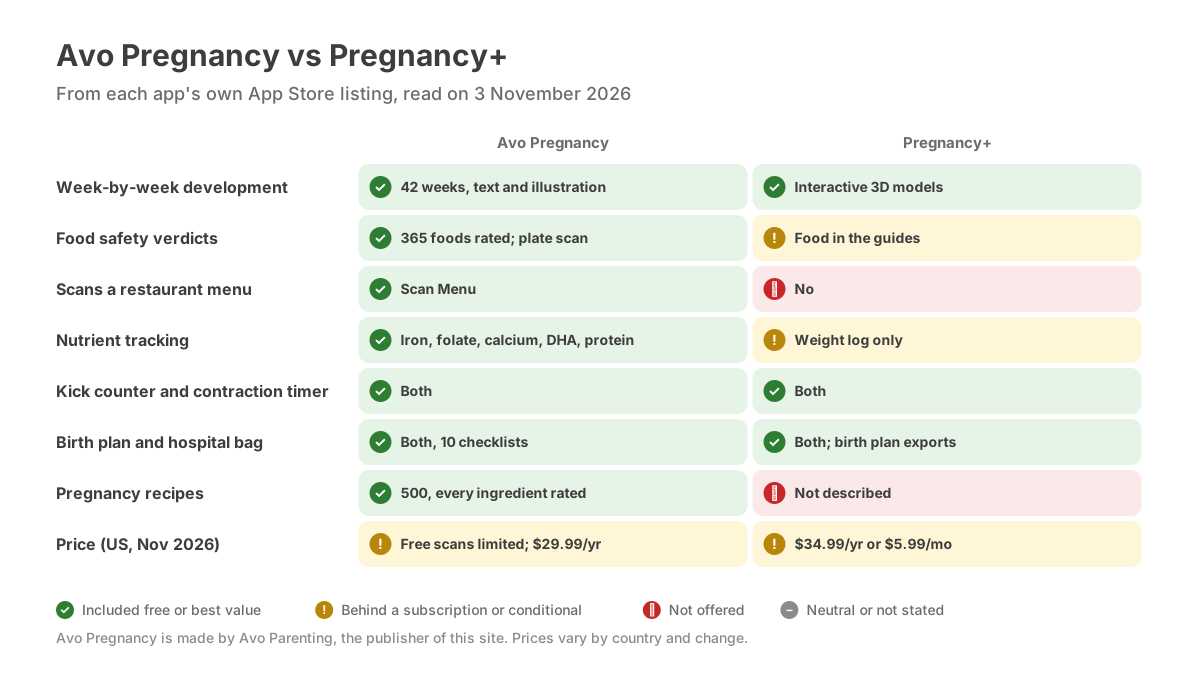
What each app does and what it costs, from their own App Store listings on 3 November 2026.
How we compared the two apps
We compared the apps on the jobs a pregnant person gives them: following the baby's development week by week, checking whether a food is safe, counting the nutrients that matter, logging kicks, weight and symptoms, planning the birth and the hospital bag, and choosing a name. We looked at what is free and what is paid, and at who stands behind the content. We did not score design, notifications or download counts.
Avo Pregnancy vs Pregnancy+ at a glance
| Avo Pregnancy | Pregnancy+ | |
|---|---|---|
| Made by | Avo Parenting, an editorial team working from NHS, FDA, ACOG, EFSA and WHO guidance | Philips Digital UK Limited; "downloaded over 80 million times" |
| Week-by-week development | 42 weeks with size comparisons, development highlights and symptoms to expect | "Unique, interactive 3D models showing your baby's development"; daily articles |
| Food safety answers | 365 foods rated Safe, Caution or Avoid with the reason; scan a plate or a product photo for a verdict | Food is one topic in its "In-depth Pregnancy Guides"; no food database or scanner is described |
| Restaurant menus | Scan Menu marks each dish "Best Picks for You" or "Better to Skip" | Not offered |
| Nutrient tracking | Iron, folate, calcium, DHA, protein and water against trimester targets | Not described; a Pregnancy Weight Log |
| Kicks, contractions, weight | Kick counter; contraction timer; mood, symptoms, weight and kicks as monthly trends | Kick Counter; Contraction Timer; Pregnancy Weight Log |
| Birth plan and hospital bag | 10 checklists including a hospital bag; a birth plan you can save and share | Birth Plan you can "customize, organize & export"; Hospital Bag "for Mother, Birth Partner & Baby" |
| Pregnancy recipes | 500 recipes filtered by trimester and dietary need, every ingredient rated Safe, Caution or Avoid | Not described |
| Price (US App Store, Nov 2026) | Free to download with a limited number of free scans; premium $29.99 a year or $3.99 a week | Free to download; Premium $34.99 a year, $12.99 or $9.99 for 3 months, $5.99 a month, $3.59 a week |
| Languages | 19 in the app; the store listing shows English | 14, including German, Italian, Swedish, Spanish, French and Polish |
| App Store rating | 5.0 from 2 ratings | 4.8 from 77K ratings |
Pregnancy+ has, by its own count, more than 80 million downloads behind it. Avo launched this year; its two ratings say only that.
Where Pregnancy+ is stronger
The 3D baby. Interactive models you can turn and zoom, week by week, are Pregnancy+'s signature feature, and nothing in Avo competes with them. Avo's week-by-week is a size comparison, the development highlights and the symptoms to expect, in text and illustration.
A new article every day. Pregnancy+ publishes a daily article alongside the week, which keeps people opening the app. Avo's week-by-week updates once a week.
Birth planning. Both apps have a birth plan and a hospital bag list, but Pregnancy+'s birth plan exports, and its hospital bag is split for mother, birth partner and baby. It is the more complete planning kit.
Translated listing. Pregnancy+ is available in 14 languages, with its store listing localised. Avo runs in 19 languages, but its store page shows English, which is a fair thing to hold against us.
Where Avo Pregnancy is stronger
It answers "can I eat this?" about the actual food. Pregnancy+ covers food in its guides, which means reading. Avo rates 365 foods Safe, Caution or Avoid with the reason, publishes the same list free in our pregnancy food library, and reads a plate or a product photo to rate what is on it.
It reads the menu. Scan Menu sorts a restaurant's dishes into "Best Picks for You" and "Better to Skip" before you order. Our eating out while pregnant guide explains the rules the scan applies.
It counts the nutrients. Iron, folate, calcium, DHA, protein and water fill rings against your trimester's targets from what you log or scan. Pregnancy+ logs weight; it does not describe nutrient tracking.
It shows where the countries differ. The FDA, the NHS and the European agencies do not agree on soft cheese, runny eggs or sushi. Avo's verdicts link to the guidance behind them, and our foods to avoid during pregnancy guide sets the US, UK and EU positions side by side.
Recipes built for the trimester. 500 pregnancy-safe recipes filtered by trimester and dietary need, each ingredient rated. Pregnancy+ does not describe recipes.
Price. Avo's premium is $29.99 a year to Pregnancy+'s $34.99. Not a large gap, but Avo is the cheaper full app.
Which app should you choose?
Choose Pregnancy+ if:
- You want interactive 3D models of your baby each week.
- You want a new article every day.
- You want an exportable birth plan and a three-way hospital bag list.
- You want a localised app in one of 14 languages.
Choose Avo Pregnancy if:
- Your most frequent pregnancy question is "can I eat this?".
- You eat out and want the menu checked before you order.
- You want iron, folate, calcium, DHA and protein counted against your trimester.
- You want the rule behind each verdict and to know where the US, UK and EU differ.
- You want pregnancy recipes with every ingredient rated.
Can you use both?
Yes, though these two overlap more than most pairs. Both count kicks, time contractions, log weight, hold a birth plan and a hospital bag list. Pick one app for those and ignore the other's copy. What is left is clean: Pregnancy+ for the 3D baby and the articles; Avo for the shop, the restaurant, the nutrient rings and the recipes. Running both at full price is $64.98 a year.
The bottom line
Pregnancy+ is the better week-by-week companion and Avo is the better food checker. If you want to see your baby in 3D and read something good every day, Pregnancy+ earns its $34.99. If the question you ask most is whether you can eat something, Avo answers it about the specific food, which a guide never will. We would keep Pregnancy+ for the week and open Avo at the table.
Our cheese in pregnancy and listeria in pregnancy guides cover the two food rules that matter most, and we have compared Avo with What to Expect, Flo, The Bump and BabyCenter the same way.
Prices, features and ratings are from the US App Store on 3 November 2026 and will change. Avo Pregnancy is made by Avo Parenting, the publisher of this site. Pregnancy+ is a trademark of its respective owner, who are not affiliated with Avo Parenting and have not reviewed or endorsed this comparison.
Frequently asked questions
Does Pregnancy+ tell you which foods are safe during pregnancy?
Its listing describes 'In-depth Pregnancy Guides covering breastfeeding, exercise, food, twins & more', so food is covered as reading. It does not describe a food database with per-food verdicts, a scanner or a menu check. Avo Pregnancy rates 365 foods, scans a plate or a product and marks each dish on a menu.
Which is cheaper, Pregnancy+ or Avo Pregnancy?
On the US App Store on 3 November 2026, Pregnancy+ Premium is $34.99 a year, $12.99 or $9.99 for three months, $5.99 a month or $3.59 a week. Avo Pregnancy's premium is $29.99 a year or $3.99 a week. Both are free to download, and Avo gives a limited number of free scans.
Do both apps have a kick counter and a contraction timer?
Yes. Pregnancy+ lists a Kick Counter that 'tracks your baby's movements & activity' and a Contraction Timer. Avo Pregnancy has a kick counter, a contraction timer and daily logging of mood, symptoms, weight and kicks shown as monthly trends. On these tools the two apps are close.
Which app has more languages, Pregnancy+ or Avo?
Avo Pregnancy runs in 19 languages in the app, though its store listing shows English, and its food library and guides are published on this site in 19 languages. Pregnancy+ lists 14, including German, Italian, Swedish, Spanish, French and Polish, with a localised store page.
Can I use Pregnancy+ and Avo Pregnancy together?
Yes. Keep Pregnancy+ for the 3D models, the daily articles and the birth plan. Open Avo at the shop, the fridge and the restaurant, and for the nutrient rings. You would end up with two kick counters and two weight logs, so pick one app for those and ignore the other's.
Sources
The guidance in this article comes from these bodies. The badge shows which region's rules each one sets.